
Improved dynamic value chips with better error segmentation
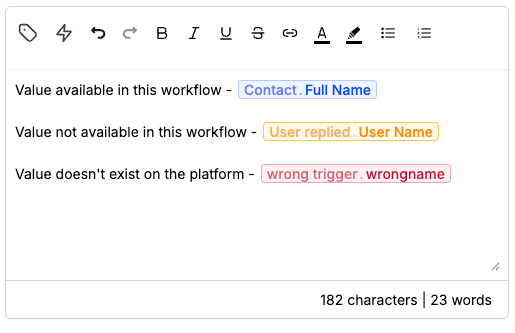
Dynamic value chips now have three states instead of two, so you can tell a value that renders blank from one that never renders at all.
Blue — the value is available in this workflow, whether it comes from the contact record, a system value like the current date, or an earlier step.
Yellow — the value is real on the platform but nothing in this workflow supplies it, so it renders blank unless another workflow passes it in through Add to Workflow with pass input trigger parameters.
Red — the value does not exist on the platform, so no workflow will render it.
Yellow is a warning, not a block — save and publish the workflow as usual. Red still catches typos, such as a misspelled field name. Spaces inside the handlebars no longer matter for matching, so a value typed with or without spaces around the field name resolves the same way. This changes the UI only; values resolve at execution time the way they did before, so anything that ran before still runs.
See Insert and edit dynamic values in workflow text fields for details.